Websocket Code Zoom: Sharks in the wire while sending server handshake
In the last post, we looked at the client handshake packet. In this post, we will be looking at the server response for the client handshake packet.
When we’re replying to the handshake, we add the Sec-Websocket-Accept header
that we obtained from the previous step using the Sec-WebSocket-Key as
explained in the previous post.
This is the general structure of the response.
HTTP/1.1 101 Switching Protocols
Upgrade: websocket
Connection: Upgrade
Sec-WebSocket-Accept: s3pPLMBiTxaQ9kYGzzhZRbK+xOo=
Sec-WebSocket-Protocol: chat
This should be enough code to send the response:
func makeResponse(websocketAccept string) string {
  lineSep:= "\r\n"
  responseString := ""
  responseString += "HTTP/1.1 101 Switching Protocols" + lineSep
  responseString += "Upgrade: websocket" + lineSep
  responseString += "Connection: Upgrade" + lineSep
  responseString += "Sec-WebSocket-Accept: " + websocketAccept + lineSep
}
// .. elsewhere

func initiateConnection(socket net.Conn) {
  // ... parse handshake
  parsedHandshake := // ... previous code
  websocketAcceptValue := computeWebsocketAccept(parsedHandshake.Headers["Sec-WebSocket-Key"])
  response := makeResponse(websocketAcceptValue)

  socket.Write([]byte(responseString))
}
Now let’s run and see what happens. To interact with the server, I set up a tiny frontend that’s served on port 8000 (HTTP), which runs beside our websocket server port 8080. This is what happens:
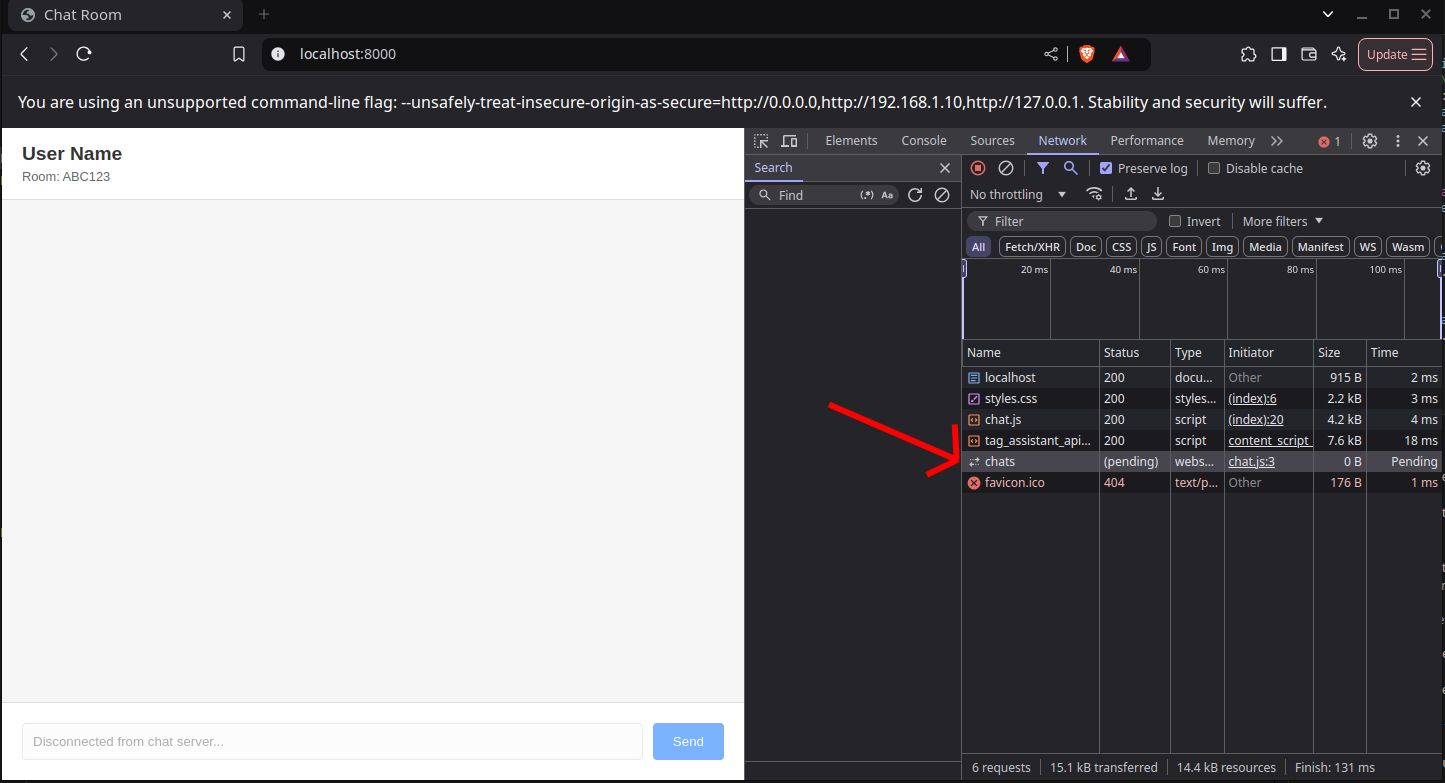
The connection remains pending. Maybe something is wrong with the broswer? 🤔 Do you think so?
Wireshark 🦈
We’re in this desperate situation now, we want to debug packets that are on the
wire and the Developer Tools won’t help, since this is below the browser’s
abstraction layer.
Those bytes on the wire need a Shark to eat them, luckily this helps. So, let me introduce Wireshark, which is a packet inspection tool that shows you contents on packets in the operating system level, which happens to be exactly what we want.
I don’t want to delve a lot into Wireshark details, but just to de-magic things
on how this happens, Wireshark opens a SOCK_RAW which is a Raw socket which
runs in “promiscuous mode” and can see all packets going through the operating
system. You can download Wireshark
here. Wireshark needs sudo to run
correctly on Linux.
Once you open Wireshark you’ll see this non-intuitive user interface which lists the network interfaces you have. If you’re not familiar, network interfaces are connection points between your computer and a network - they can be physical (like your WiFi card or Ethernet port) or virtual (like loopback or VPN interfaces). Each interface handles sending and receiving network packets, and in the case of physical interfaces, they communicate directly with the hardware to transmit these packets over the network medium.
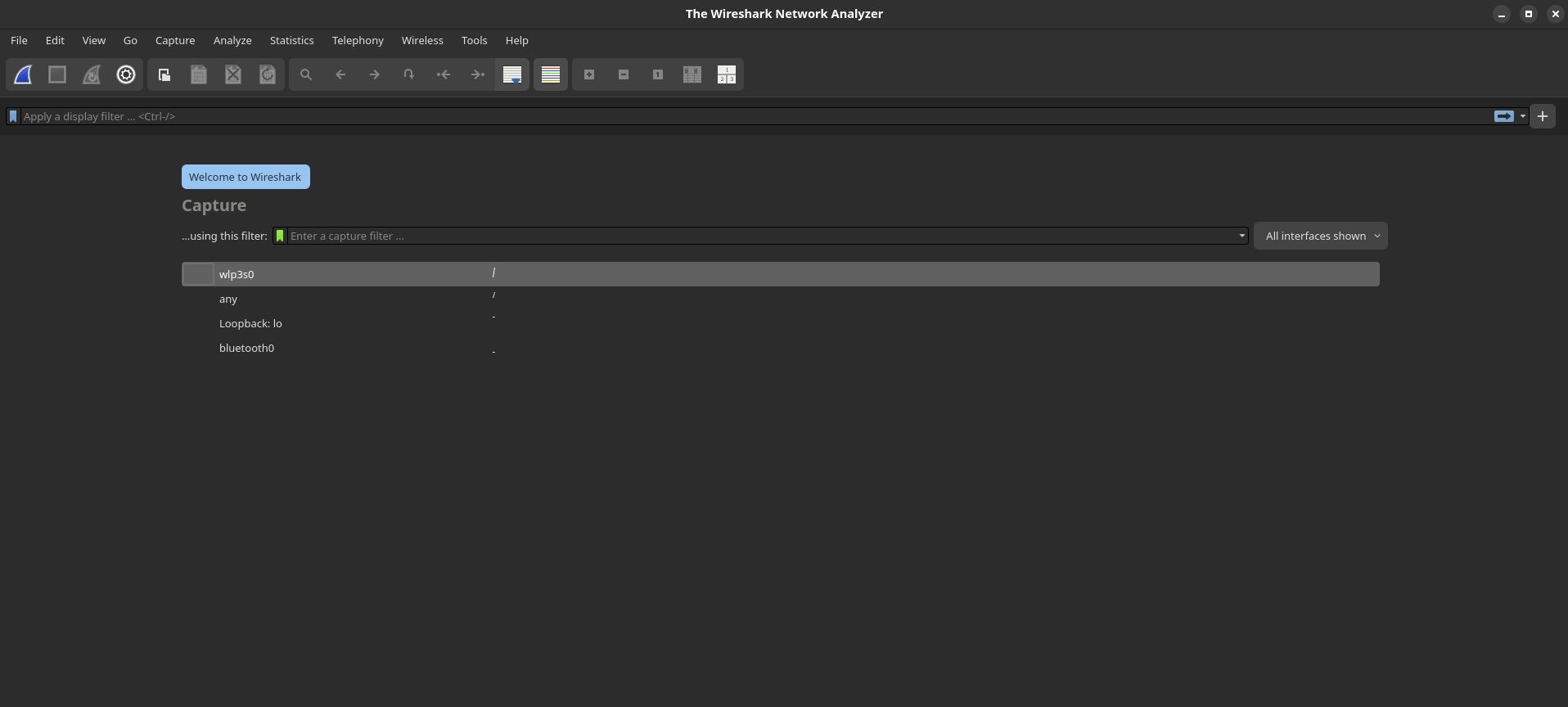
So, for the sake of this tutorial, we’ll be dealing with the loopback
interface, which is a virtual network interface that allows your computer to
communicate with itself, like when a process wants to communicate with another
process, or when you’re running a development HTTP server. It’s commonly
accessed through localhost or the IP address 127.0.0.1.
Why are we choosing it? because we’re sending packets from our browser, to our
development server running on localhost so those are two processes
communicating with each other on the same computer. Off you go, select the
loopback interface (loopback might have other names on other operating
systems, I haven’t used Windows since about 8 years, so please pardon me.)
Now you’ll see running packets!, this is what matters for us now in the main interface.
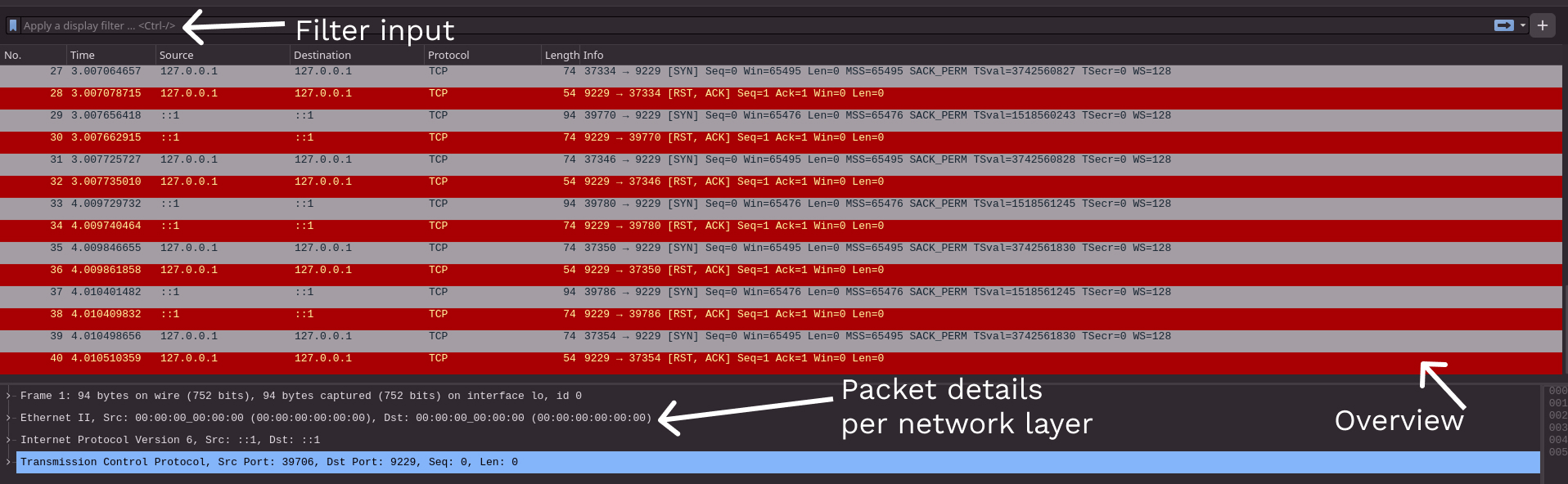
We’ll be using the filter section soon enough, let’s start with packet details
section now for an HTTP packet. We see the source, destination (both ::1
which is loopback in IPv6), protocol and body.
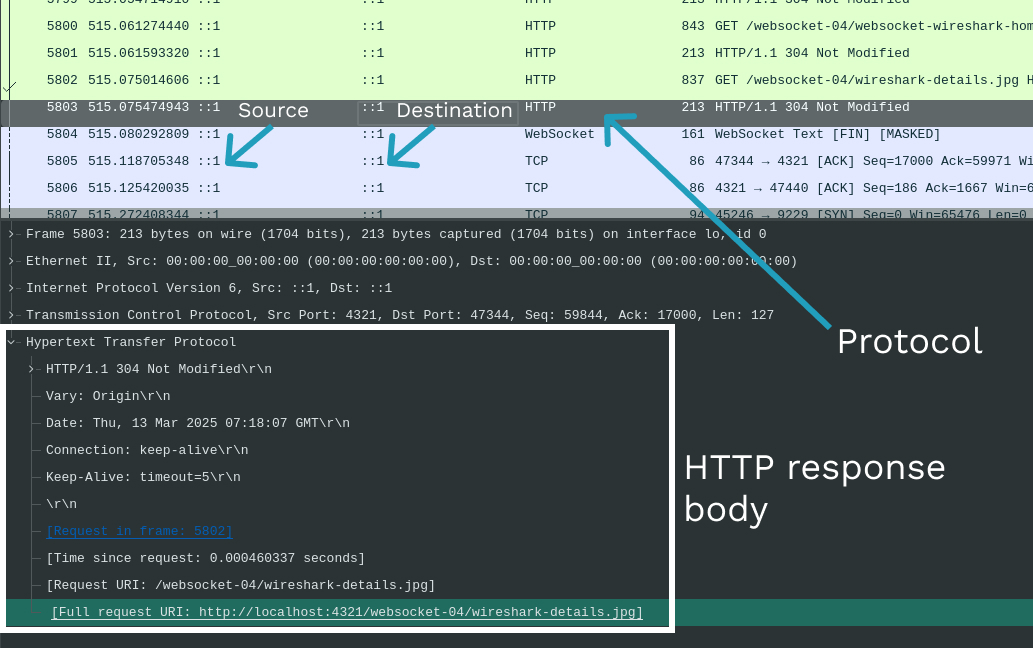
This is what we see in the Hypertext Transfer Protocol section, which is basically the HTTP response from the server running my blog, locally.
Hypertext Transfer Protocol
    HTTP/1.1 304 Not Modified\r\n
    Vary: Origin\r\n
    Date: Thu, 13 Mar 2025 07:18:07 GMT\r\n
    Connection: keep-alive\r\n
    Keep-Alive: timeout=5\r\n
    \r\n
Debugging 🐞
Now let’s go back to our problem, the browser was seeing the request as pending, so we want to see the packets that are coming out from the server and see what’s wrong with it. To do this, we need to apply some filters in wireshark so we see only the packets we are interested in.
We need tell Wireshark to filter packets that are going to or coming from our
Websocket server, which is running on port 8080, using TCP here is because
the HTTP protocol knows nothing about ports, but TCP which is transporting
HTTP / Websocket packets does.
tcp.dstport == 8080 || tcp.srcport == 8080now we start capturing packets from Wireshark. From the client handshake here,
we see that the client is running on port 38202.
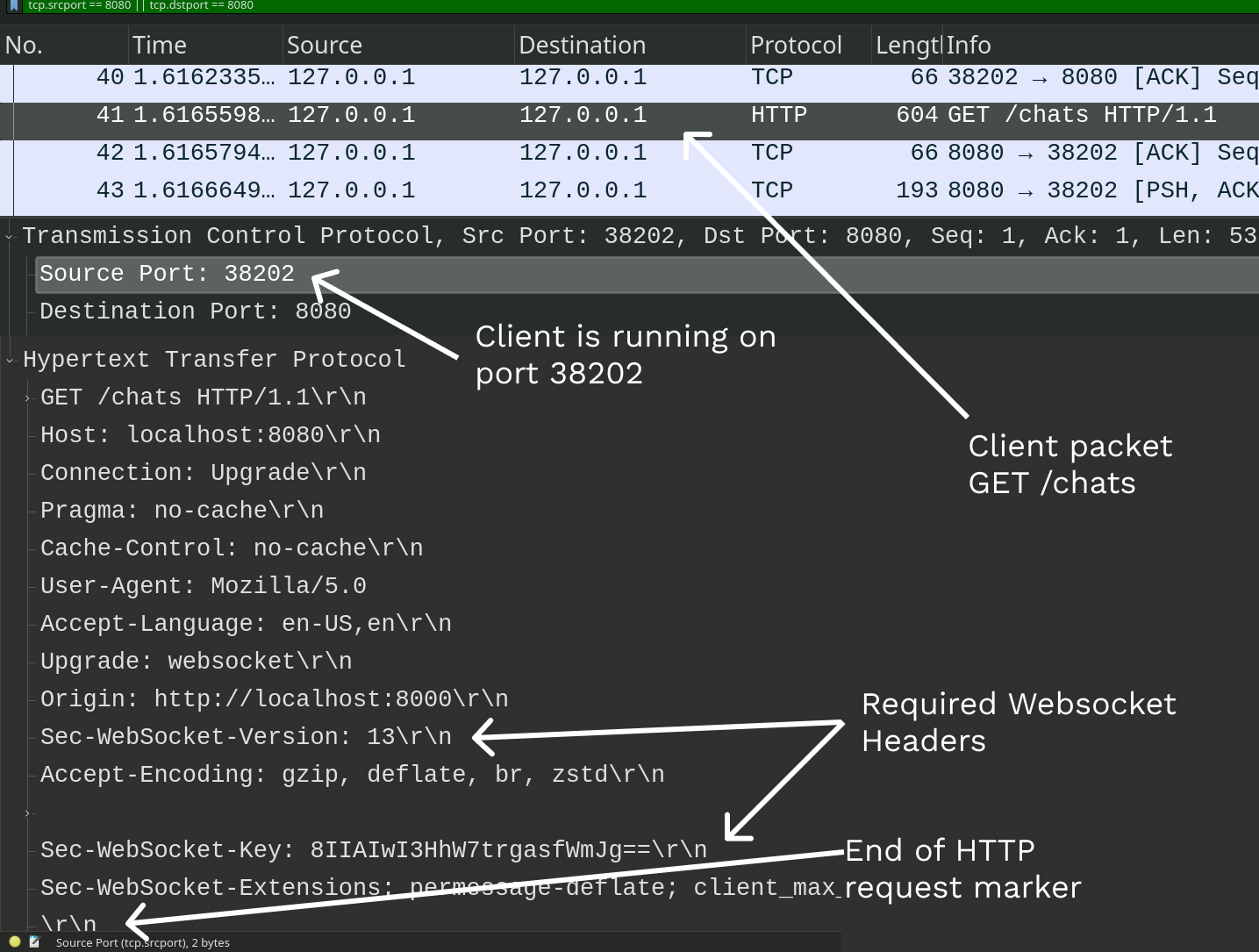
Good, now we want to see what the server sent back to the client, we can either
check the next packet or modify our filter to just display packets sent from our
server on port 8080 AND to the client on port 38202.
tcp.dstport == 38202 && tcp.srcport == 8080Let’s have a closer look when applying our filter, we’re seeing 3 packets. Which one is the response from our server? 🤔 If you select the 3 packets in Wireshark you’ll see that two will have a Segment Length of 0, this is a “Wireshark indicator” that the packet has no data, although the TCP protocol spec doesn’t say that exactly.
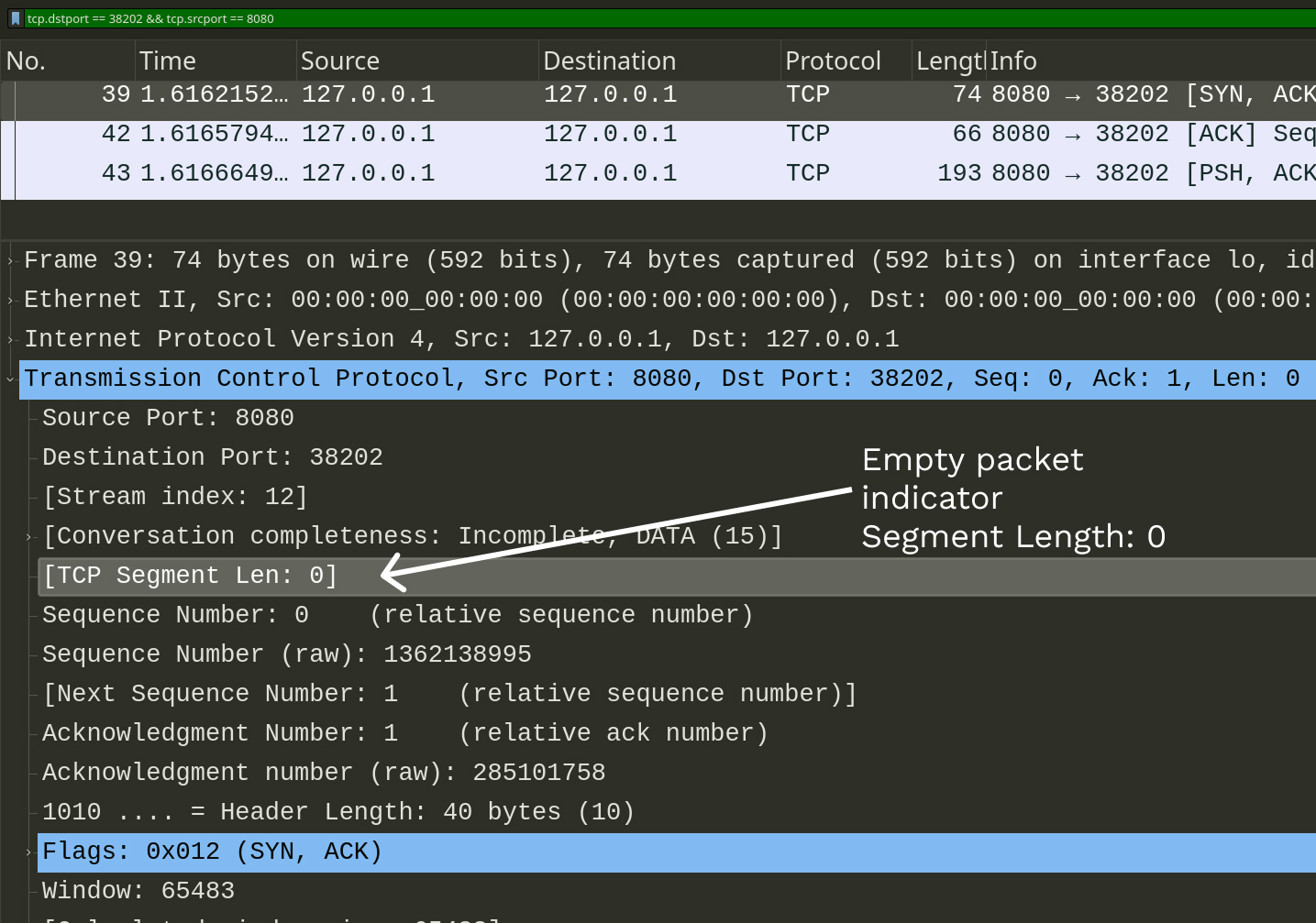
Side note
Whenever a TCP packet is sent, a client sends an ACKnowlodgement packet back. Also when the TCP connection is started a SYNchornization packet at the begining of communication and a FINish packet when the connection is closing
So our final suspect is the last packet with length 193 bytes. Let’s check it
out, but wait a second. Why is it appearing as a TCP packet, although we were
sending an HTTP response. Wireshark should have interpreted it as an HTTP
packet. Is it a bug in Wireshark? 🤔 Let’s see what’s inside this TCP packet.
Right click on the “TCP segment data section” and right-click on it. Select
“Show packet bytes…” and in the view, near the bottom you’ll find the “Show
As” section, select ASCII Control so everything in the packet is displayed,
not just printable characters.
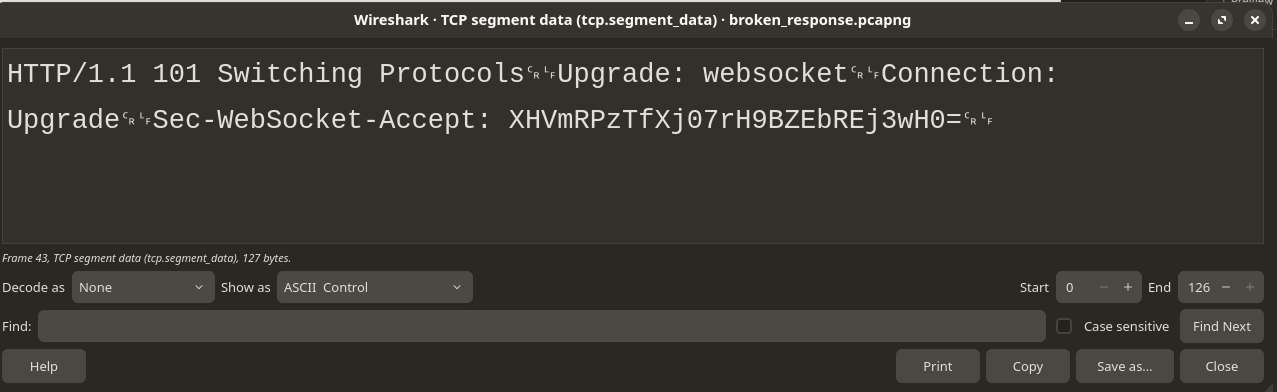
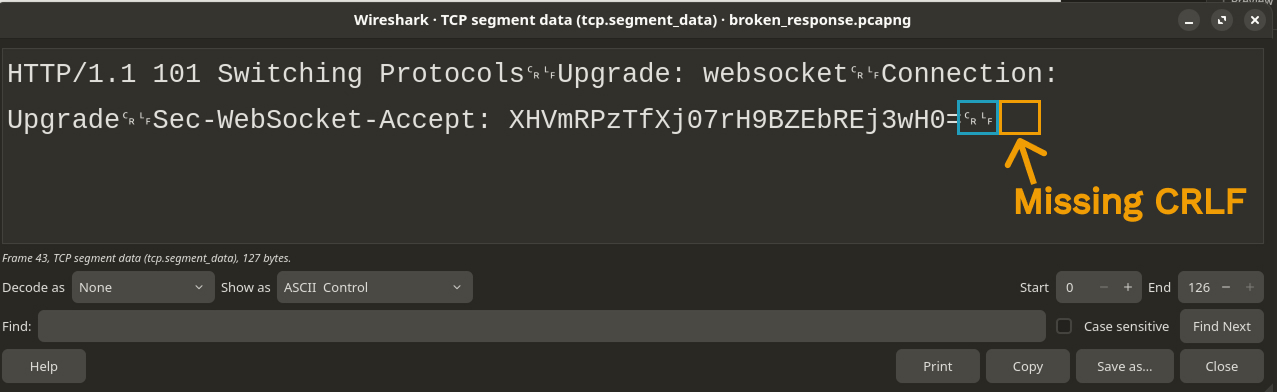
This is the content
HTTP/1.1 101 Switching Protocols␍␊Upgrade: websocket␍␊Connection: Upgrade␍␊Sec-WebSocket-Accept: XHVmRPzTfXj07rH9BZEbREj3wH0=␍␊Looks like an HTTP response? but why is it interpreted as TCP then? Can you guess why?
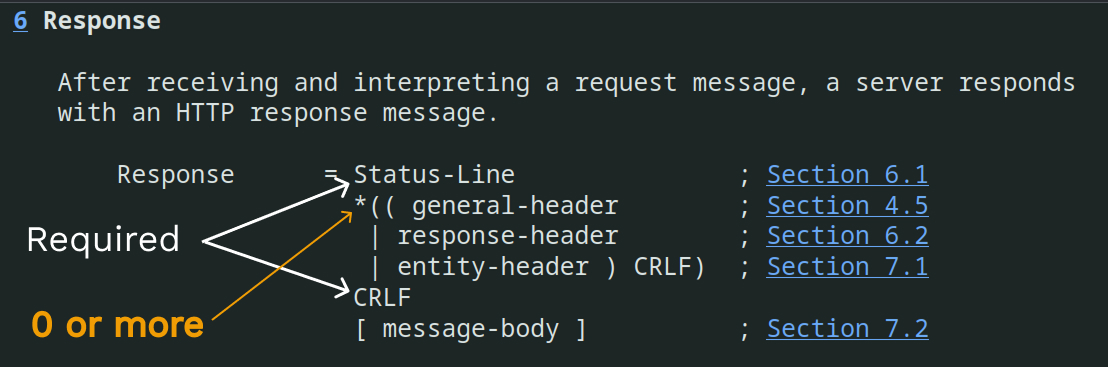
Let’s check the HTTP
RFC2616 to see what
it says about the correct HTTP response format. So, this is say you MUST have a
Status-Line, followed by 0 or more headers where each header line is ending in
CRLF which is \r\n then, there MUST be a CRLF before the optional response
body. In our case, we don’t have a response body, we have some headers though.
Resolving the HTTP response bug ✨
So, it seems like we are missing the required CRLF at the end of our request,
since each header we have is followed by a CRLF in the response we saw above.
Oke then!, let’s fix the bug and try again. This will be the modified code for
func makeResponse(websocketAccept string) string {
  lineSep:= "\r\n"
  responseString := ""
  responseString += "HTTP/1.1 101 Switching Protocols" + lineSep
  responseString += "Upgrade: websocket" + lineSep
  responseString += "Connection: Upgrade" + lineSep
  responseString += "Sec-WebSocket-Accept: " + websocketAccept + lineSep
  responseString += lineSep // Brrr.... This was the missing line.
}
Now let’s check Wireshark:
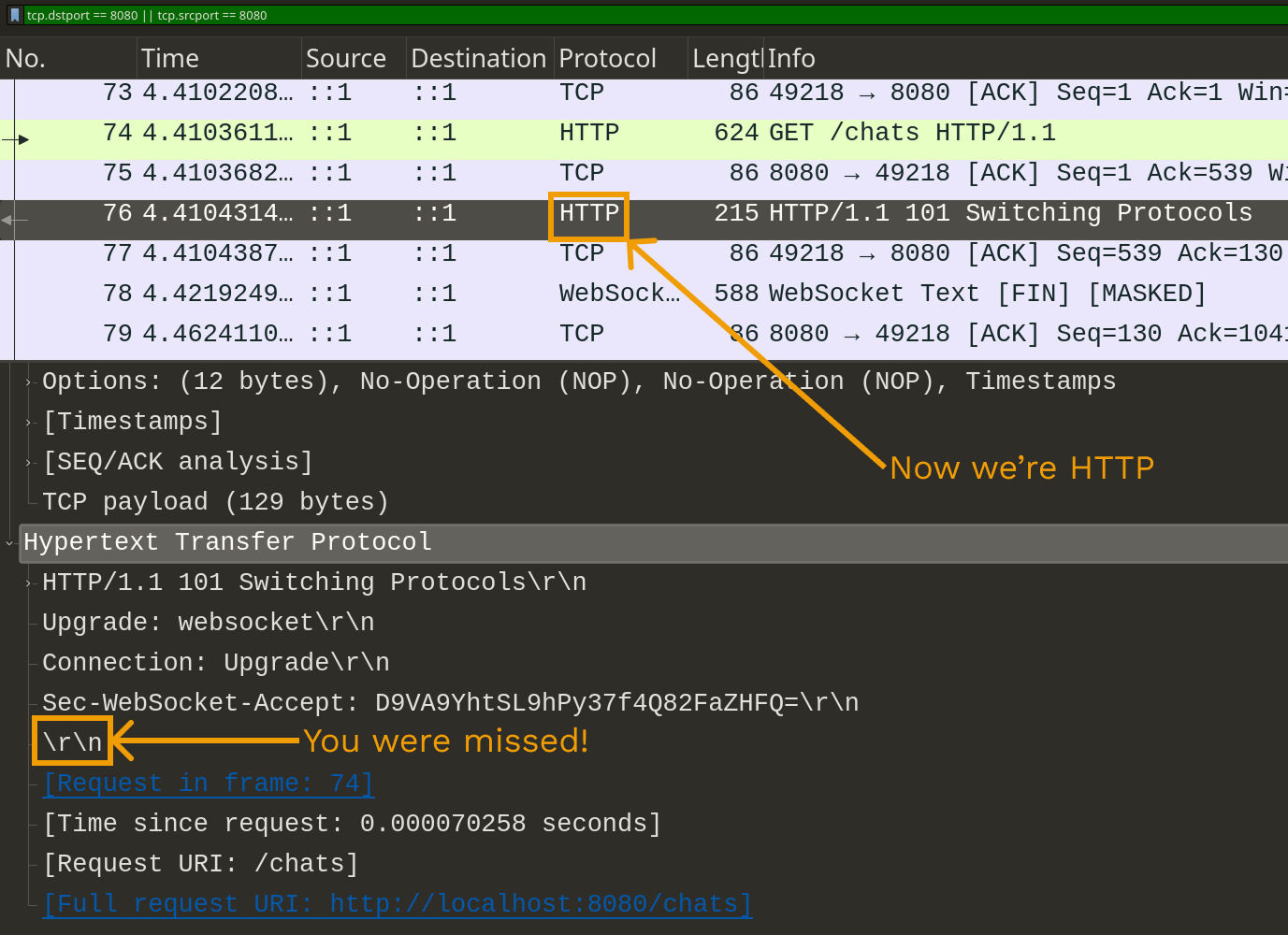
Now the Websocket connection is alive and Kicking! 🚀
I hope you find this post useful, feel free to reach out for any comments/questions. Happy coding 📜